Flexible Stays is a powerful feature that allows you to open up bookable nights between your existing reservations—those gaps shown in your calendar that wouldn't normally be available due to your minimum-stay requirements or fixed check-in and check-out policies. By activating Flexible Stays, you can make these nights available to guests without changing your standard property settings, helping you capture short-stay demand and maximize your rental income throughout the year.
Understanding Flexible Stays
Many property owners set minimum-stay requirements or specific check-in and check-out days to streamline operations. However, these settings can create calendar gaps—periods between bookings that remain unavailable, especially during peak seasons when guests are actively searching for short-term accommodations. Flexible Stays solves this problem by allowing you to temporarily adjust these rules for gap periods, making additional revenue opportunities available without affecting your overall property management strategy.
How to Activate Flexible Stays
Step 1: Log Into Your Holidu Account
Begin by logging into your Holidu account and selecting the property you wish to configure. You can access Flexible Stays settings from two locations: the Discounts section or the Calendar section. Both approaches lead to the same configuration options.
Step 2: Navigate to the Discounts Section
To set up Flexible Stays:
- Click on "Configuration" in the left-hand menu
- Scroll down and select "Discounts"
- Continue scrolling to the bottom of the page
- Locate the option labeled "Fill short gaps between reservations" and click "Configure"
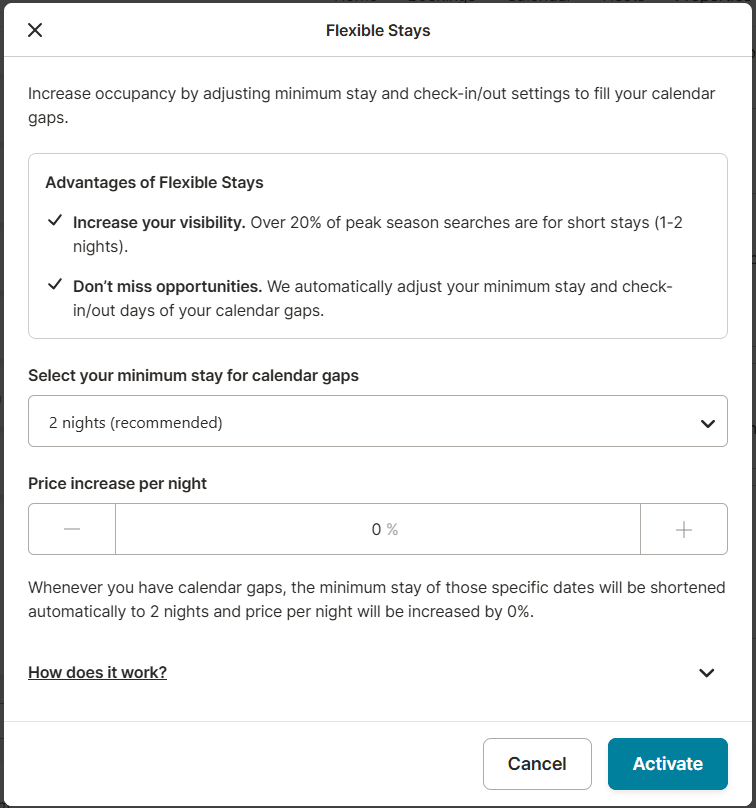
Step 3: Configure Your Flexible Stay Settings
In the configuration dialog, you'll need to set two key parameters:
- Minimum Stay Length: Choose between 1, 2, or 3 nights for the gap period. This determines the shortest booking duration you'll accept for flexible-stay bookings.
- Pricing: Set the nightly rate for these flexible bookings. You can increase the price up to 50% above your standard nightly rate to account for the short-stay nature of these bookings.
Step 4: Activate the Feature
Once you've configured your preferred minimum stay length and pricing, click "Activate" to enable Flexible Stays for your property. The feature will immediately begin opening up qualifying gap nights for reservations.
Key Benefits of Flexible Stays
Increased Booking Volume
Flexible Stays enables you to capture short-stay bookings during peak seasons when these reservations are in high demand. Short-stay travelers represent a significant portion of the vacation rental market, and enabling these bookings can substantially increase your annual occupancy rate.
Enhanced Search Visibility
Research shows that over 20% of peak-season searches are for short stays. By making your property bookable for these durations, you improve your visibility in search results and reach a broader audience of potential guests actively seeking flexible accommodation options.
More Guest Reviews
Each new booking—whether for a long weekend or a few nights between longer reservations—represents an opportunity for guest feedback. Additional reviews help build social proof and credibility for your property on the Holidu platform.
Improved Search Rankings
Properties with fewer calendar gaps and higher booking potential receive better visibility and ranking support in Holidu's search results. Flexible Stays helps demonstrate that your property is actively bookable across various timeframes, supporting your performance metrics.
Reduced Administrative Burden
Rather than manually adjusting your calendar settings for each individual gap, Flexible Stays automates this process. You set it once and let the system handle opening up qualifying nights, saving you considerable time and effort in property management.
Important Considerations and Rules
Calendar Gaps Only
Flexible Stays exclusively affects calendar gaps where your current minimum-stay or check-in/check-out settings would normally prevent bookings. It doesn't override existing reservations or manually blocked dates.
Setting Overrides
When activated, Flexible Stays temporarily overrides your standard minimum-stay requirements and fixed check-in/check-out day rules for qualifying gap periods. Your regular settings remain unchanged for all other bookings.
Flexible Check-In and Check-Out
For Flexible Stay bookings, guests can check in and check out on any day of the week, providing maximum flexibility and increasing the likelihood of booking these gap nights.
Booking-Specific Rules
Once a Flexible Stay booking is confirmed, the special pricing and stay rules apply only to that specific reservation period. Other bookings continue to follow your standard property rules.
Clear Calendar Labeling
Flexible Stay bookings appear distinctly tagged in your calendar, allowing you to quickly identify which reservations were made through this feature. This helps you understand your booking patterns and guest preferences.
Easy Deactivation
You maintain complete control over the feature and can deactivate Flexible Stays at any time through the same configuration menu. There's no long-term commitment required.
Frequently Asked Questions
Can I exclude certain dates from Flexible Stays?
Currently, when you activate Flexible Stays, it applies to all gap nights that match your configured settings across your calendar. However, you retain the ability to manually block any specific dates you prefer to keep unavailable. This gives you flexibility to protect dates for maintenance, personal use, or any other reason while still benefiting from Flexible Stays for other gap periods.
Can I change my Flexible Stays settings later?
Yes. You have complete control over your Flexible Stays configuration and can update or disable the feature at any time. Log back into the Discounts section and access the "Fill short gaps between reservations" option to modify your minimum-stay length, adjust pricing, or deactivate the feature entirely. Changes take effect immediately and don't affect existing reservations.
How does Flexible Stays affect my property's overall pricing strategy?
Flexible Stays operates independently from your standard pricing structure. The special rates you set for gap bookings only apply to those specific flexible-stay reservations. Your regular nightly rates for standard bookings remain unchanged, allowing you to maintain a clear pricing hierarchy between different booking types.
Will activating Flexible Stays require me to change my minimum-stay policy?
No. Flexible Stays works alongside your existing minimum-stay requirements rather than replacing them. Your standard minimum-stay policy continues to apply to all regular bookings. Flexible Stays only temporarily adjusts these rules for the gap nights you've specifically configured, so your overall property management approach remains consistent.
What happens if a gap fills with a regular booking before a Flexible Stay booking?
If a guest books a gap period under your standard rates and terms before a Flexible Stay booking is made, the regular booking takes precedence. Flexible Stays only applies to remaining gap nights that aren't already reserved through normal channels.
Do you want to contact us?
We’re here to help. You can contact us directly if you need assistance or have questions.
Contact us